





Smart Education: Course Exception Request
Course exception requests involve multiple departments and can be cumbersome, often relying on emails and manual follow-ups. The Course Exception Request Process streamlines this by automating submissions and routing requests efficiently. It keeps students informed and creates an audit trail to enhance transparency and communication among stakeholders.
Growth, the SimplyCast Way
When This Process Is Used
The Course Exception Request Process is used when a student needs an academic requirement, course rule, or registration condition to be reviewed and potentially waived, substituted, overridden, or otherwise modified. Common situations include:
- Student requests a course waiver
- The student needs a course substitution
- A transfer credit does not meet a standard requirement
- The student requires an exception to a program requirement
- Approval is needed for late registration
- Requests for a withdrawal exception
- Requires an academic standing exception
- A student's circumstances require an academic requirement to be reviewed outside the standard process
Triggers
The workflow can begin when:
- A student submits an exception request
- An advisor initiates a request on behalf of the student
- A department identifies a situation requiring an exception
- A registrar or academic administrator creates a request
- A supporting academic process identifies the need for an exception
Outcomes
Who Is Involved?
Student → Academic Reviewer → Department Approver → Registrar and/or Academic Administrator/Authority → Student
Actions for Success
How It Works
Submit → Validate → Review → Decide → Record → Notify → Update
Step 1 - Submit
The student or authorized staff member submits the course exception request through a digital form and provides the required academic information and supporting documentation.
Step 2 - Validate
The system checks the submission for required information and documentation.
Decision: Is the request complete?
→Yes: Continue to route to review.
→ No: Return to requester for additional information before entering the formal review process.
Exception Handling →
Incomplete Submission? → The system identifies missing information or documentation and requests completion before the request proceeds.
Step 3 - Route
The completed request is automatically routed to the appropriate reviewer or department based on the exception type, program, course, or institutional rules.
Step 4 - Review
The reviewer evaluates the request, supporting documentation, academic circumstances, and applicable requirements.
Exception Handling → Additional Documentation Required → The reviewer requests supporting information, and the request remains active until the required material is provided.
Step 5 - Decide
The request can be approved, rejected, returned for additional information, or escalated for additional review.
Decision: Does the request meet the applicable criteria?
→ Yes: Continue toward approval.
→No: Reject or Decision: Is an additional authority required?
→ Yes: Route to additional approver
Exception Handling →
Additional Approval Required - Requests outside normal departmental authority are escalated to the appropriate academic authority.
→ No: Continue to reject or request additional information
Exception Handling →
Rejected Request - The decision and rationale are recorded, and the student receives the appropriate notification.
Step 6 - Record
The decision, supporting information, approvals, and relevant communications are recorded in the request's history.
Decision: Is the request approved?
→ Yes: Record and implement
→ No: Notify requester and close record
Step 7 - Notify
The student and relevant participants receive the appropriate notification of the decision or status.
Step 8 - Update
Where applicable, the approved exception is reflected in the appropriate academic or administrative system.
Other exceptions:
- Request Withdrawn - the student's withdrawal will preserve its history and audit record.
- Duplicate Request - potential duplicates can be identified and routed for review, rather than creating multiple active requests.
- Workflow Failure - if an integration, routing rule, notification, or other automated process fails, the request can be flagged for administrative intervention rather than disappearing from the workflow.
What It Enables
Capabilities
- Digital Request Intake: Capture course exception requests and supporting information via structured forms.
- Request Validation: Identify incomplete or invalid submissions before formal review.
- Exception Routing: Direct requests to the appropriate reviewer or approver based on defined rules.
- Review & Approval Management: Coordinate academic review, recommendations, approvals, rejections, and escalations.
- Document Management: Collect and associate supporting documentation with each request.
- Status & Communication Management: Keep students and staff informed throughout the request lifecycle.
- Exception Workflow Management: Accommodate different exception types and non-standard process paths.
- Audit & Records Management: Maintain a complete history of actions, decisions, approvals, and communications.
- Academic Record Coordination: Connect approved decisions with downstream academic record processes.
Key Features
- Digital exception request forms
- Exception type selection
- Supporting document upload
- Automated completeness checks
- Rule-based routing
- Review and approval workflows
- Automated status notifications
- Decision and rationale tracking
- Complete audit trail
- Academic record/system integration
Results
Operational
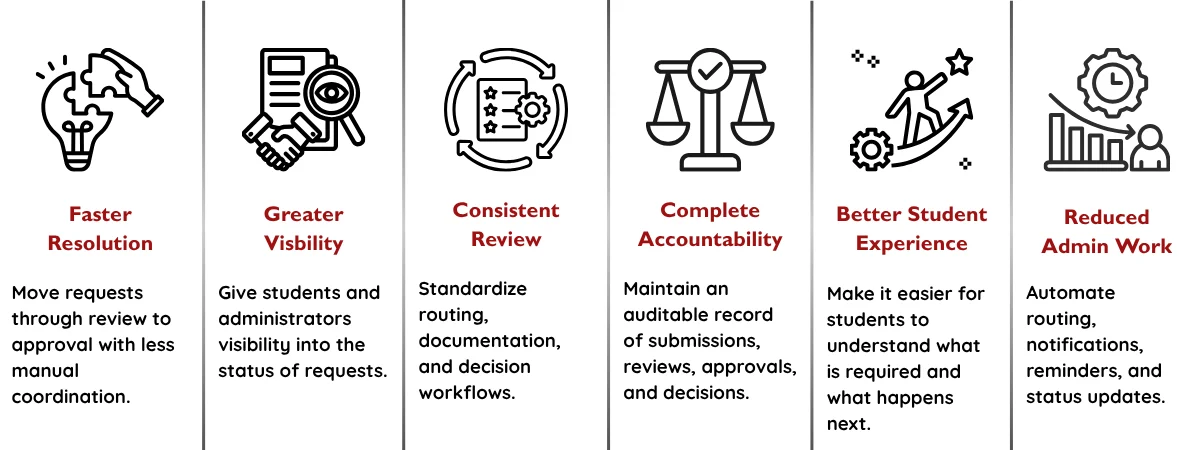
- Reduce manual request coordination.
- Shorten request processing times.
- Reduce incomplete submissions.
- Standardize exception routing and review.
- Reduce administrative follow-up.
- Improve visibility into outstanding requests.
- Maintain complete decision histories.
User
- Make requests easier for students to submit.
- Clearly communicate what information is required.
- Provide visibility into request status.
- Reduce uncertainty around next steps.
- Deliver faster and more consistent communications.
- Make it easier for staff to review complete requests.
Organizational
- Improve academic process governance.
- Strengthen policy compliance.
- Improve auditability.
- Standardize exception handling across departments.
- Improve institutional visibility into exception activity.
- Create a reliable record of academic decisions
Measures / KPIs
- Average request processing time
- Request completion rate
- Percentage of requests requiring additional information
- Requests processed within the target timeframe
- Average time at each approval stage
- Approval/rejection rate
- Number of outstanding requests
- Percentage of requests with complete audit records
Where Else Can It Be Used?
Example Deployments
Course Waiver Requests
Students request permission to waive a course requirement when they have an approved alternative qualification or circumstance.
Course Substitution Requests
Students request approval to use an alternative course toward a program requirement.
Transfer Credit Exceptions
Transfer credits that do not map directly to standard requirements are routed for academic review and decision.
Program Requirement Overrides
Students request an exception to a specific program or degree requirement based on documented circumstances.
Late Registration Approvals
Students request permission to register after a standard registration deadline.
Withdrawal Exceptions
Students request an exception to standard withdrawal policies when circumstances warrant additional review.
Academic Standing Exceptions
Requests involving probation, progression, or other academic standing requirements can be routed through a controlled approval workflow.
Independent Study Exceptions
Requests that fall outside standard independent-study rules can be reviewed and approved through the same framework.
Resources
Course Exception Request Pricing - One Pager
Course Exception Request - One Pager
Double-click on the video thumbnail to view in fullscreen.
Frequently Asked Questions
Yes. The workflow can be configured to support different exception types, each with its own requirements, routing rules, reviewers, approval levels, and decision criteria.
Yes. Required information, approval paths, routing rules, notifications, escalation processes, and other workflow elements can be configured around institutional and departmental requirements.
Yes. Routing and approval workflows can be configured according to factors such as department, faculty, program, course, exception type, or delegated approval authority.
Yes. The process can support different submission and access roles. For example, students may submit their own requests while advisors, faculty, or administrators can initiate or manage requests on a student's behalf.
The workflow can support multiple review and approval stages, including sequential approvals, additional reviewers, escalations, and conditional approval paths.
Yes. A centralized workflow can support institution-wide exception management while allowing individual faculties, departments, or programs to maintain their own rules and approval structures.
Yes. Workflow rules, forms, routing, approval requirements, and communications can be updated as institutional policies and academic requirements evolve.
Yes. Institutions can begin with a specific high-volume or high-friction exception process and expand the workflow to additional exception types, departments, or academic processes over time.
No. The Course Exception Request Process is designed to orchestrate the workflow around the request and can integrate with existing student information, academic records, advising, and other institutional systems. You can combine multiple use cases, products, and solutions that could potentially replace all of your systems with Smart Education.
The workflow can be demonstrated using a realistic exception scenario that shows the student submission, automated routing, review and approval process, notifications, audit trail, and downstream record updates.